Usage
All figures shown on this page are generated by ./scripts/generate_docs_assets.sh.
The CI job runs this script before mkdocs build --strict, so the published site
always uses freshly generated assets.
Animations support --format gif|mp4|webm.
If the file extension in --output does not match the selected format, nucshape
adjusts it automatically. Wireframe mesh is enabled by default; use
--no-show-mesh to disable it for both the rendered object and its shadow.
Use --dpi and --zoom to control output resolution and framing.
Axes are hidden by default (--axes none).
Physical Background
Nuclear shape model
shape and shape-anim render a deformed surface from a compact multipole model:
In the default quadrupole convention, the triaxial components are built from
beta2 and gamma, i.e. \(\beta_2\) and \(\gamma\), as:
--quadrupole-mode beta-gamma keeps the same CLI workflow but interprets
beta (alias beta2), i.e. \(\beta\) (or \(\beta_2\)), as a non-negative quadrupole amplitude and \(\gamma\) as
the triaxial angle, with \(0^\circ\) corresponding to prolate and \(60^\circ\) to
oblate in the canonical sector.
For nuclear surfaces, colors can encode either Cartesian position or local deformation. In deformation mode, the plotted scalar is built from:
Orbital surface model
orbital and orbital-anim visualize the angular part of real spherical
harmonics. This is an angular rendering tool, not a full bound-state wavefunction
with radial dependence.
lis the angular momentum quantum number (\(l = 0, 1, 2, \ldots\)).mis the magnetic quantum number (\(-l \le m \le l\)).
The displayed radius is built from normalized harmonic amplitude:
The surface color encodes the signed field value:
Orbital mixing
When orbital or orbital-anim uses mixing parameters, the rendered field is
a linear interpolation between two angular components:
where \(w\) is the mixing weight. In animations, \(w\) can follow a smooth periodic
cycle between --mix-weight and --mix-weight-end.
Orbital Surfaces (orbital)
This command renders one angular surface from a real spherical harmonic.
Available options:
- Required: --output, --l, --m
- Surface geometry: --title, --radius-scale, --power, --min-radius
- Optional static mixing: --mix-l, --mix-m, --mix-weight
- Sampling and view: --n-theta, --n-phi, --elev, --azim, --dpi, --zoom, --projection
- Style: --theme, --cmap, --no-show-mesh, --transparent, --axes, --shadow, --shadow-alpha, --shadow-color
Physics reminder:
- l controls angular complexity.
- m controls azimuthal structure with \(-l \le m \le l\).
- Radius is derived from normalized \(|Y_{lm}|^{\mathrm{power}}\).
- Color encodes the signed real harmonic value.
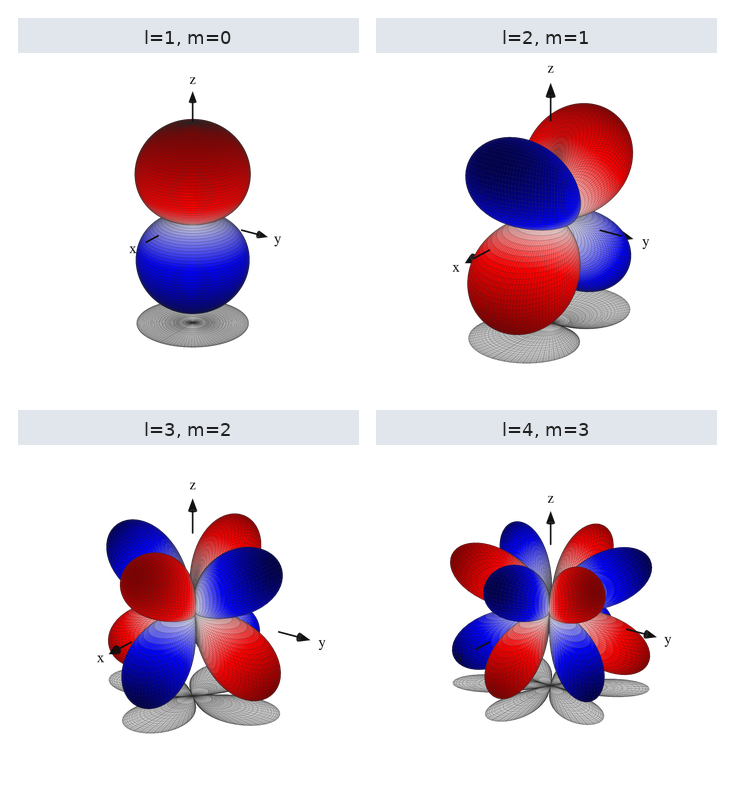
Representative command:
./scripts/nucshape orbital \
  --output docs/assets/generated/orbital_examples/orbital_l3_m2.png \
  --l 3 --m 2 \
  --theme phase --transparent --axes all \
  --shadow --shadow-alpha 0.10 \
  --n-theta 96 --n-phi 192
Reference panel (2x2, generated by the docs asset pipeline):
Orbital Animations (orbital-anim)
This command animates either a pure orbital view or a mixing between two components.
Available options:
- Required: --output, --l, --m
- Output and loop: --format, --append, --duration-seconds, --fps, --workers
- Optional mixing controls: --mix-l, --mix-m, --mix-weight, --mix-weight-end, --mix-weight-cycles
- Camera motion: --camera-turns, --camera-direction
- Surface geometry: --radius-scale, --power, --min-radius
- Sampling and view: --n-theta, --n-phi, --elev, --azim, --dpi, --zoom, --projection
- Style: --theme, --cmap, --no-show-mesh, --transparent, --axes, --shadow, --shadow-alpha, --shadow-color
Use cases:
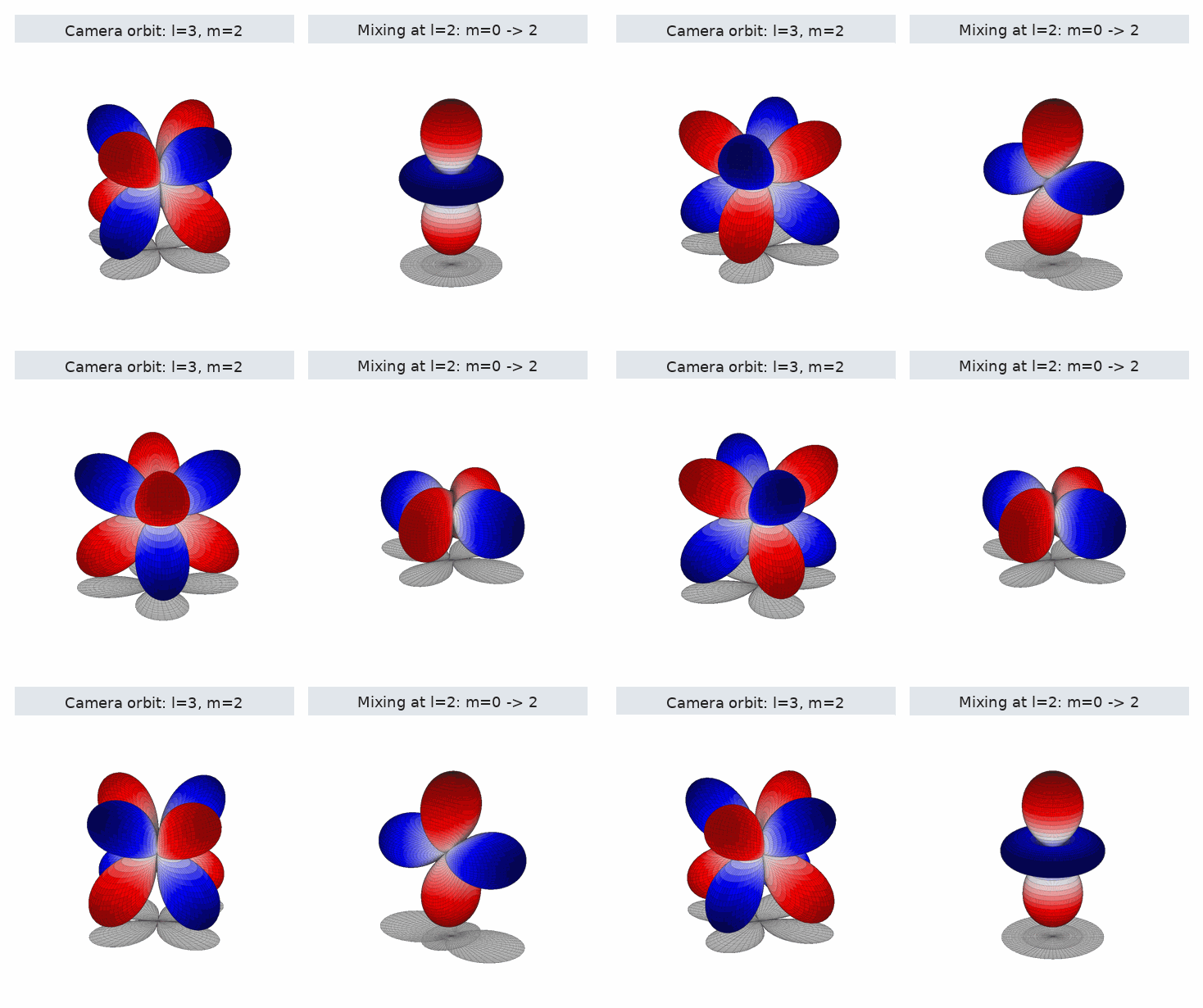
- camera orbit around a fixed \((l,m)\) surface;
- smooth interpolation between two \((l,m)\) components;
- fixed camera (--camera-turns 0) for pure structural comparison.
Fixed \(l=3\), \(m=2\) with camera rotation:
./scripts/nucshape orbital-anim \
  --format gif \
  --output docs/assets/generated/orbital_l3_m2_camera.gif \
  --l 3 --m 2 \
  --duration-seconds 4 --fps 18 --workers 1 \
  --camera-turns 1 --camera-direction ccw \
  --theme phase --transparent \
  --shadow --shadow-alpha 0.10 \
  --n-theta 72 --n-phi 144
Mixing example at fixed \(l=2\) with different \(m\) values:
./scripts/nucshape orbital-anim \
  --format gif \
  --output docs/assets/generated/orbital_mix.gif \
  --l 2 --m 0 --mix-l 2 --mix-m 2 \
  --mix-weight 0.00 --mix-weight-end 1.00 --mix-weight-cycles 1 \
  --duration-seconds 4 --fps 18 --workers 1 \
  --camera-turns 0 \
  --theme phase --transparent \
  --shadow --shadow-alpha 0.10 \
  --n-theta 72 --n-phi 144
Animated panel:
Nuclear Shape Images (shape)
This command renders one static nuclear surface.
Available options:
- Required: --output
- Shape parameters: --title, --r0, --beta2/--beta, --gamma, --beta3, --beta4
- Quadrupole convention: --quadrupole-mode legacy|beta-gamma
- Color mapping: --color-mode, --color-scale
- Sampling and view: --n-theta, --n-phi, --elev, --azim, --dpi, --zoom, --projection
- Object orientation: --object-rot-x, --object-rot-y, --object-rot-z
- Style: --theme, --cmap, --no-show-mesh, --transparent, --axes, --shadow, --shadow-alpha, --shadow-color
Quadrupole conventions:
- legacy uses the internal mapping already present in the code base for \(\beta_2\) and \(\gamma\).
- beta-gamma treats beta as a non-negative amplitude and \(\gamma\) as the triaxial angle (\(0^\circ = \text{prolate}\), \(60^\circ = \text{oblate}\)).
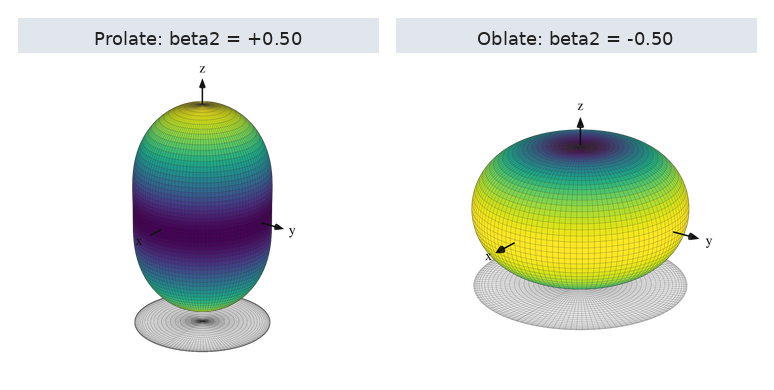
Simple prolate/oblate examples:
./scripts/nucshape shape \
  --output docs/assets/generated/shape_examples/shape_prolate_simple.png \
  --beta2 0.5 \
  --theme viridis --transparent --axes all \
  --color-mode deformation \
  --shadow --shadow-alpha 0.10 \
  --n-theta 60 --n-phi 120 --zoom 1.15
Generated panel (2x1):
\(\beta\)-\(\gamma\) Deformation (shape with --quadrupole-mode beta-gamma)
Use the same command family with canonical \(\beta\)-\(\gamma\) quadrupole parameters.
Representative commands:
./scripts/nucshape shape \
  --output docs/assets/generated/shape_examples/shape_beta_gamma_gamma0.png \
  --quadrupole-mode beta-gamma \
  --beta 0.5 --gamma 0 \
  --theme viridis --transparent --axes all \
  --color-mode deformation --color-scale 0.25 \
  --shadow --shadow-alpha 0.10 \
  --n-theta 96 --n-phi 192 --zoom 1.15
Generated panel (3x1):

Nuclear Shape Animations (shape-anim)
This command covers both rigid rotations and time-dependent deformations.
Available options:
- Required:
--output - Output and loop:
--format,--append,--duration-seconds,--fps,--workers - Camera motion:
--camera-turns,--camera-direction - Object spin:
--object-turns-per-camera-turn,--object-turns-total,--object-spin-direction,--object-spin-axis-x,--object-spin-axis-y,--object-spin-axis-z - Time-dependent deformation:
--beta2-end/--beta-end,--beta2-cycles/--beta-cycles,--beta3-end,--beta3-cycles,--beta4-end,--beta4-cycles,--gamma-end,--gamma-cycles - Static shape and rendering inputs:
--r0,--beta2/--beta,--gamma,--beta3,--beta4,--quadrupole-mode,--color-mode,--color-scale,--n-theta,--n-phi,--elev,--azim,--dpi,--zoom,--projection,--object-rot-x,--object-rot-y,--object-rot-z - Style:
--theme,--cmap,--no-show-mesh,--transparent,--axes,--shadow,--shadow-alpha,--shadow-color
Rotations Around the Deformation Axis
The docs asset pipeline generates a 2x2 animated panel with prolate, oblate,
spherical, and octupole cases. Each one uses a fixed camera and an object spin
around the deformation axis.
Representative command:
./scripts/nucshape shape-anim \
  --format gif \
  --output docs/assets/generated/rotations/prolate_rotation.gif \
  --duration-seconds 3 --fps 18 --workers 1 \
  --camera-turns 0 \
  --object-turns-total 1 --object-spin-axis-z 1 \
  --beta2 0.5 \
  --theme viridis --transparent --axes all \
  --color-mode deformation --color-scale 0.25 \
  --shadow --shadow-alpha 0.10 \
  --n-theta 30 --n-phi 60
Animated panel (2x2):

Evolving Deformations
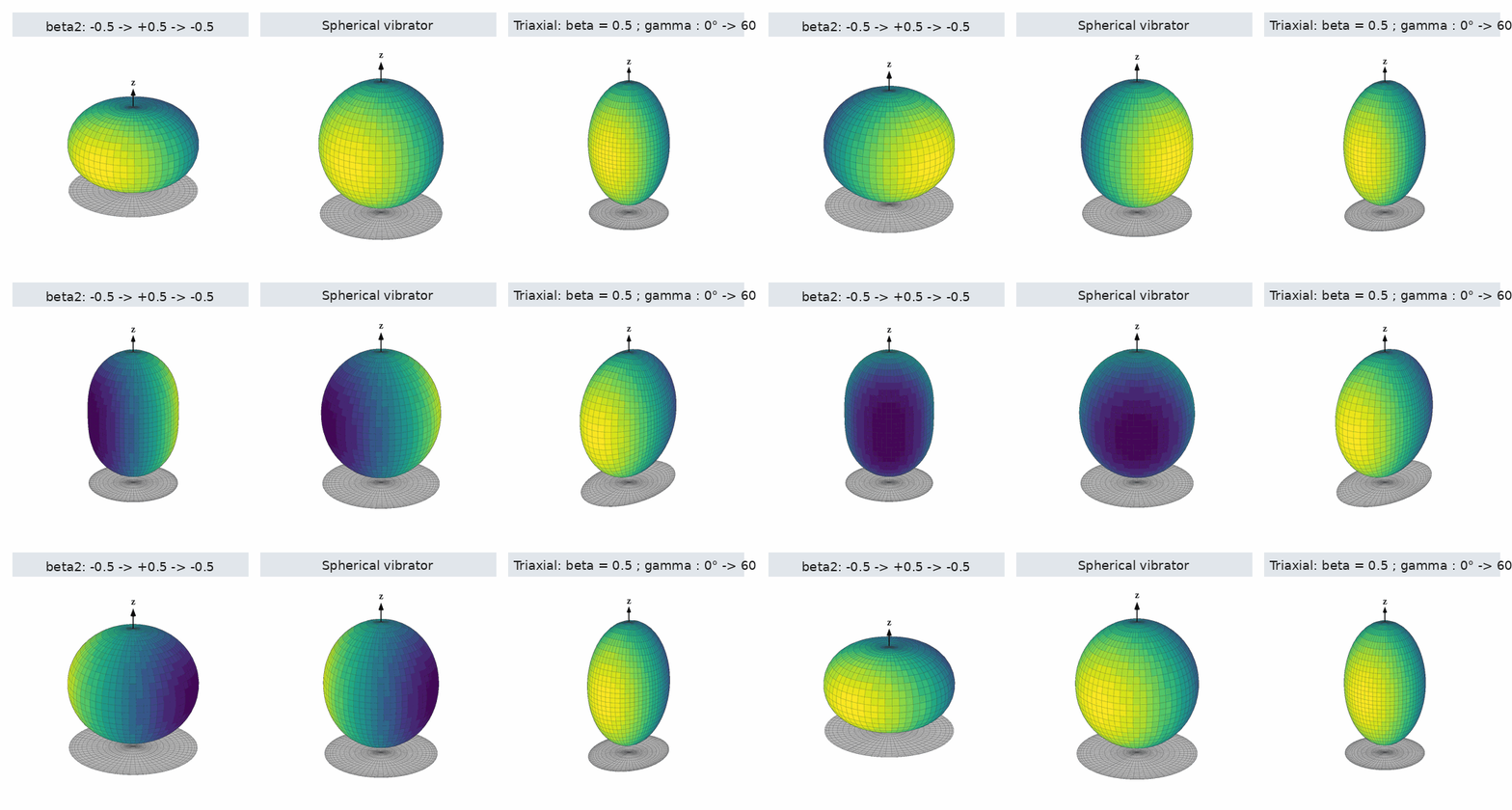
Example 1: \(\beta_2\) varies from \(-0.5\) to \(+0.5\) and back.
./scripts/nucshape shape-anim \
  --format gif \
  --output docs/assets/generated/shape_anim_prolate_oblate.gif \
  --duration-seconds 4 --fps 20 --workers 1 \
  --camera-turns 0 \
  --object-turns-total 1 \
  --beta2 -0.50 --beta2-end 0.50 --beta2-cycles 1 \
  --theme viridis --transparent --axes z \
  --color-mode x \
  --shadow --shadow-alpha 0.10 \
  --n-theta 30 --n-phi 60
Example 2: spherical vibrator.
./scripts/nucshape shape-anim \
  --format gif \
  --output docs/assets/generated/shape_anim_spherical_vibrator.gif \
  --duration-seconds 4 --fps 20 --workers 1 \
  --camera-turns 0 \
  --object-turns-total 1 \
  --beta2 0.05 --beta2-end 0.18 --beta2-cycles 8 \
  --theme viridis --transparent --axes z \
  --color-mode x \
  --shadow --shadow-alpha 0.10 \
  --n-theta 30 --n-phi 60
Example 3: triaxial evolution in beta-gamma mode, i.e. along a \(\beta\)-\(\gamma\) trajectory.
./scripts/nucshape shape-anim \
  --format gif \
  --output docs/assets/generated/shape_anim_triaxial.gif \
  --duration-seconds 4 --fps 20 --workers 1 \
  --quadrupole-mode beta-gamma \
  --object-turns-total 1 \
  --beta 0.5 \
  --gamma 0 --gamma-end 60 --gamma-cycles 1 \
  --theme viridis --transparent --axes z \
  --color-mode x \
  --shadow --shadow-alpha 0.10 \
  --n-theta 30 --n-phi 60
Animated panel (3x1):
Theme Comparison
Theme-related options are available on every render command:
- --theme {classic,mono,ocean,phase,sunset,viridis}
- --cmap <matplotlib-name> to override the built-in colormap
- --transparent to keep only the rendered object/surface
List built-in themes:
./scripts/nucshape themes
Reference grid:

TOML Configuration (run-config)
This command executes any CLI command from a TOML file.
Available options:
- Positional argument: config
- Optional flag: --dry-run
Configuration rules:
- top-level command = "shape" | "shape-anim" | "orbital" | "orbital-anim" | "orbital-table"
- [options] keys map to CLI options, using underscores instead of dashes
- ready-to-use examples live in examples/configs/
Example:
./scripts/nucshape run-config examples/configs/shape_anim_quick_test.toml
./scripts/nucshape run-config examples/configs/shape_anim_quick_test.toml --dry-run
Minimal TOML snippet:
command = "shape-anim"

[options]
output = "outputs/shape_anim_from_toml.gif"
format = "gif"
duration_seconds = 5
fps = 24
camera_turns = 0
object_turns_total = 2
object_spin_axis_z = 1.0
beta2 = 0.1
beta2_end = 0.4
beta2_cycles = 1
transparent = true
axes = "none"